UPDATE 14 July
Read through to the end of this post to see how it IS now working on WordPress.com blogs – with no need for an iframe embed code (just the URL).
Introduction
I get a Rabbitgram email each morning from The Rabbit Agency with the latest in the digital world.
This morning they linked to a post that appeared yesterday on the Instagram blog that says:
Today, we’re excited to introduce web embedding for Instagram content and bring you an easy way to add Instagram photos and videos to the stories you want to tell.
Now, when you visit an Instagram photo or video page on your desktop web browser, you’ll see a new share button on the right side of your photo (just under the comments button). Click the button to see the embed code. Copy the block of text it gives you and paste it into your blog, website or article. When you hit publish, the photo or video will appear.
It doesn’t work on WordPress.com blogs.
The reason it doesn’t work is that iframes are not allowed. WordPress just strips them out.
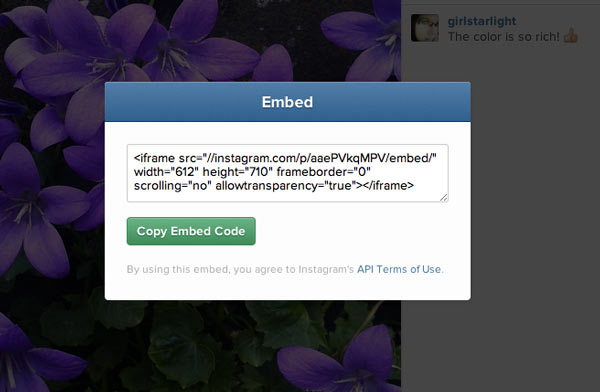
This is a screen-grab of one of my Instagram images. You can see the embed button below the comments button. Clicking that brings up the embed code that I have shown in the second screen grab. As you can see, the code is an iframe.

Coda
Here is the link to an article I put on the Quillcards Blog where I was able to easily embed some Instagram photos.
I thought the images themselves would be clickable, but in fact it is the little word ‘Instagram’ above the image that has to be clicked.
When you hover over the word (as you will see) it changes to ‘View On Instagram’.
But it is not super-obvious, which I think it really ought to be.
Update 14 July
A big thank you to JenT from GammaGirl who has been following up the Instagram issue with the support staff at WordPress, and now by simply pasting in the URL of the image it renders as the new Instagram version – like here:
Leave a Reply to JenTCancel reply