I Am Using The Liquorice WordPress Theme

After several months of using the Enterprise theme from Studiopress – and telling TT at One Cool Site Blogging Tips that I had no intention of changing from it – I changed to this theme.

I changed the CSS a bit by:

    Making the title a bit smaller
    Taking out the corners on the post title backgrounds
    Changing the background color of the post titles

and that’s it!

This is what the theme looks like without the CSS changes:
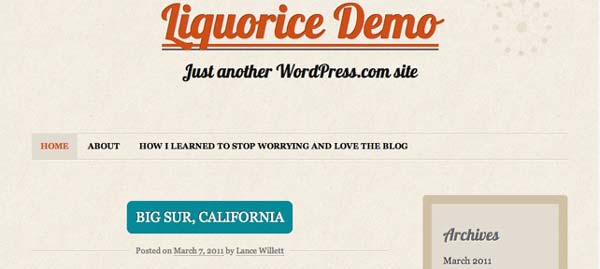
Liquorice Before CSS Changes

Update – What The Theme Options Section Looks Like
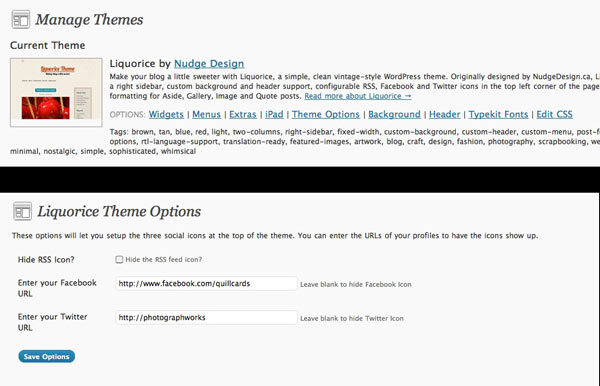
Liquorice Options
Liquorice Options


Discover more from Photograph Works

Subscribe to get the latest posts sent to your email.

Comments

14 responses to “I Am Using The Liquorice WordPress Theme”

  1. I like it! It looks great on your blog. 🙂 One thing I would suggest as you have the CSS upgrade is to move the blog title up. IMO there’s a lot of empty space up there.

    Like

    1. Thanks – it’s fun to play with.

      As you know, the CSS is not completely free-form and one of the restrictions is that there is a space left for the social media icons that is difficult to remove.

      I added the icons in (or rather I made them visible by adding my credentials) and they now take up part of the space.

      Like

  2. shawn

    How did you get the social icons to work? I’m not seeing an easy way to add them. Did you go into the code to change it?

    thanks!

    Like

    1. Just go to Appearance > Themes > and assuming you have Liquorice as the current theme, then go to ‘Theme Options’ and you will see where to add your credentials.

      Like

  3. shawn

    Ok, they must have removed the options. I don’t see the ‘Theme Options’ appearing. I’ll try a reinstall or something. Thanks!

    Like

    1. Take a look at the two admin screens I have added as a jpeg at the end of the article.

      Like

  4. Hi David,

    This is driving me mad! I’ve been trying to get the ‘theme options’ link for the last two days, and it is not happening!

    I have updated WordPress, in case that was the problem, and I have deleted and reinstalled the theme.

    I am running Liquorice 1.5.7.

    This is what my theme page look likes: http://img827.imageshack.us/i/picture1jya.png/

    If you have any suggestions, I would be most grateful!

    Thanks!

    Like

    1. It looks to me that you are using a self-hosted WordPress site. Up to now, I have only used Liquorice on this WordPress.com site, but I have various WordPress.org sites, including one that I use as a test site. I just installed Liquorice and I can’t see any theme options either.

      I’ve just taken a screen grab of the options that come with the dot.com version and the dot.org versions and I will post them now so you can see the difference.

      Like

  5. Thanks for your quick response.
    The main reason I have been pursuing this is because I want to have a twitter icon up the top left (with the rss one), and I believe “theme options” allows for this option.
    Is there any alternative means of achieving this goal?

    Like

    1. See this post I just put up with screen grabs.

      I don’t know how to do what you are trying to do. Have you asked the author of the theme? I see he or she is at Nudge Design

      Like

  6. […] Reader: See the comments on this article and you will understand why I am putting these two screen grabs up […]

    Like

  7. Do you know what font liquorice is using? I want to stay consistent with another page I’m building.

    Like

    1. I didn’t know what font was being used. However, this theme is available for WordPress.org and while there may be simpler ways of finding out which font is being used in the header, I just downloaded the theme and looked at the header file.

      This shows that the font is pulled from Google fonts and that it is named Lobster.

      You can find it here: Google Web Fonts Lobster.

      Like

      1. Awesome! Thanks SO much!!!

        Like

Leave a reply to Tegan Cancel reply

This site uses Akismet to reduce spam. Learn how your comment data is processed.

Discover more from Photograph Works

Subscribe now to keep reading and get access to the full archive.

Continue reading