
Pushing Photoshop Sliders

roan-antelope

I used the Nik Vivenza plugin and then Filter > Noise > Reduce Noise with the noise slider pushed all the way across to the max and the details slider at its minimum. After several passes, the images starts to take on a life of its own.

Click the image for a much larger version.

And here’s a closeup showing what I mean about the effect of using the noise reduction tool several times.
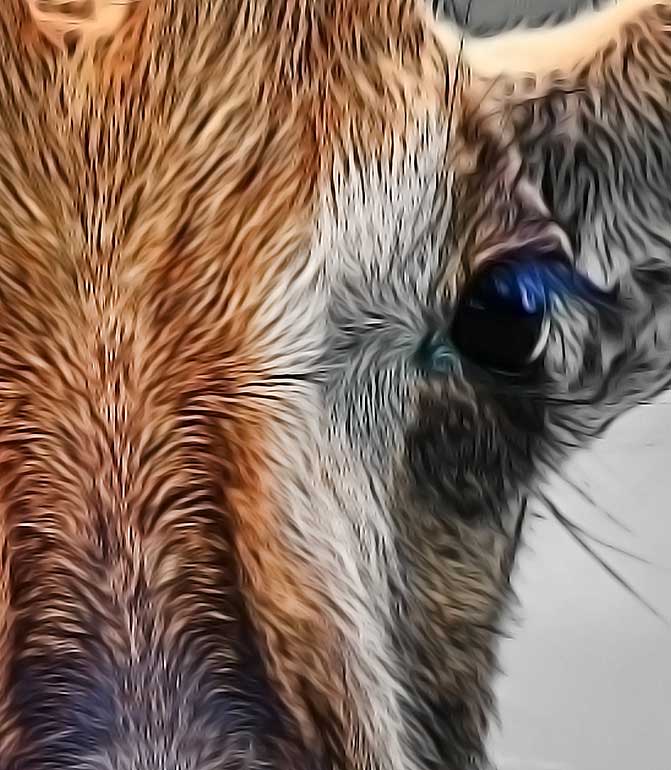
roan-antelope-closeup


Discover more from Photograph Works

Subscribe to get the latest posts sent to your email.

Comments

11 responses to “Pushing Photoshop Sliders”

  1. Interesting effect!

    I haven’t installed any plugins in this version of PS that I have now … not sure how it works.

    Like

    1. I bought the Nik plugins when Google bought the Nik company. There are YouTube videos to learn how to install plugins to Photoshop

      Like

      1. Yes. Thanks.

        Like

  2. I looked at the Nik software in Google. Is it a standalone programme or a plugin? Thinking loosely about downloading a free trial.

    Like

    1. I use it within Photoshop – not sure whether it works standalone.

      Like

      1. It’s not clear. Just read another blogger, who’d just installed it on his new MacBook Air, and he didn’t have any photo editor before. Will read more …

        Like

        1. Where are you looking? I’ll take a look 🙂

          Like

            1. I think this is what you need. Looks like it works as a plugin for various applications.

              On the ‘help’ page it says that the app will look for the ‘most appropriate installed applications’

              And at the foot of the home page it has this for Mac:

              Mac® OS X 10.7.5 through 10.10
              Adobe Photoshop CS4 (CS5 for HDR Efex Pro 2) through CC 2014
              Adobe Photoshop Elements 9 through 13 (apart from HDR Efex Pro 2, which is not compatible with Photoshop Elements)
              Adobe Photoshop Lightroom 3 through 5
              Apple® Aperture® 3.1 or later

              Like

              1. Thanks! And yes, I’ve been reading too and it’s compatible with CC 2015, which is what I have. Will do the free trial, for starters

                Like

  3. […] from Google. I’d never heard about it before, and then I came across it twice, in two fellow bloggers‘ posts the same week. Decided to check it […]

    Like

Leave a comment

This site uses Akismet to reduce spam. Learn how your comment data is processed.

Discover more from Photograph Works

Subscribe now to keep reading and get access to the full archive.

Continue reading